
Every page-one result for "best AI sales tools" is a vendor listicle, and every one of them ranks the vendor's own product first. This one is also written by a vendor — we build an AI SDR system — so here's the deal upfront: our product appears exactly once, in its own category, clearly labeled as ours, with its drawbacks printed next to it. Everything else on this page is a tool we've evaluated, competed against, migrated clients off of, or watched work.
The bigger problem with those lists isn't the bias, though. It's the format. A flat "top 20" ranking that puts Gong at #3 and Instantly at #7 is comparing a flight recorder to a jet engine. They don't compete — they do different jobs at different layers of the same stack, and a team that buys them in the wrong order gets nothing from either. The most expensive mistake we see isn't picking the wrong tool. It's picking a good tool for a layer that wasn't the bottleneck.
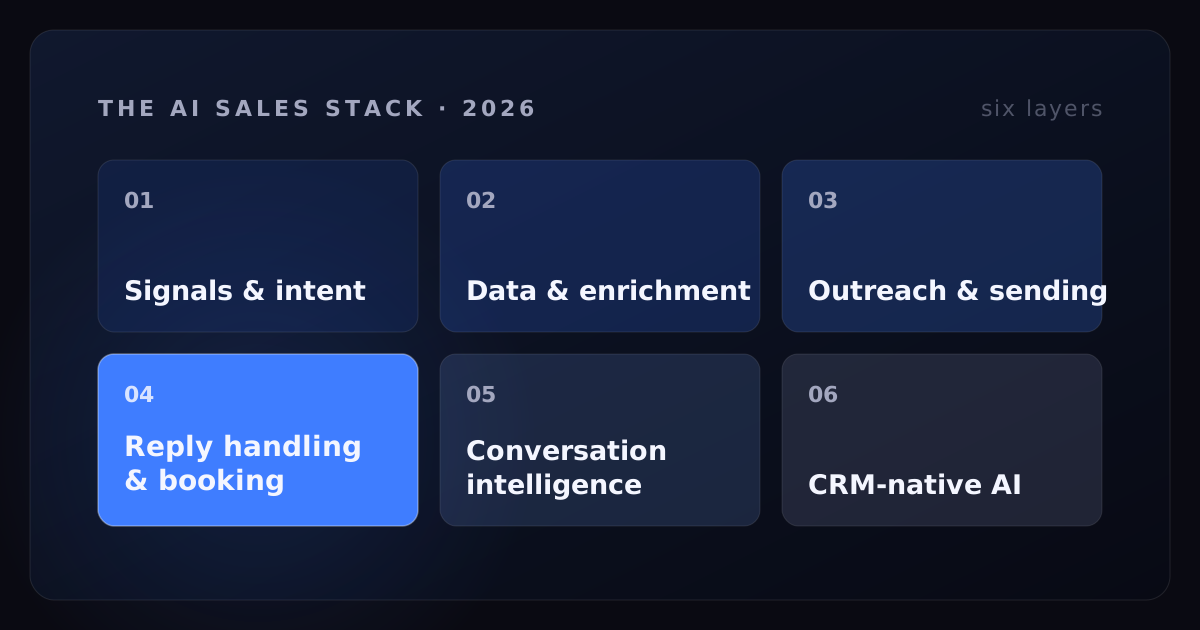
So this guide is organized the way a working stack is actually built: six layers, from the signal that tells you who to contact down to the CRM where the meeting lands. For each layer — the job it does, the real tools in it, what they're genuinely good at, and the caveat the sales page leaves out.
- Flat tool rankings mislead. An AI sales stack has six layers — signals, data, sending, reply handling, conversation intelligence, CRM AI — and tools only compete within a layer.
- For most teams the bottleneck is Layer 4, reply handling and speed to lead — the one layer almost no "best tools" list treats as a category.
- Sending tools are transport, not brains. They move messages; they don't decide what to say when a human answers.
- Judge every purchase on cost per booked meeting at day 90, not seat price. A cheap tool that books nothing is the most expensive thing you own.
- Every layer needs an operator. If you can't name the human who will run a tool, don't buy it — buy an outcome instead.
How we judge AI sales tools (it's one number)
We're not reviewers. We run AI sales systems in production for clients every day — watching buying signals, sending outreach, answering replies at 2am, booking meetings across LinkedIn, email, voice, and SMS. The systems we operate have booked 7,000+ meetings. That work forces a scoring system on you whether you want one or not, and it isn't a feature checklist.
It's cost per booked meeting. Total spend on the layer — subscription, credits, and the human hours it takes to operate — divided by the qualified meetings it produced. Feature lists don't survive contact with that number. Plenty of impressive tools turn out to be expensive per meeting because they optimize a layer that was never the constraint; plenty of boring tools are cheap per meeting because they quietly fixed the one that was.
Two disclosures before the list. First, there are no affiliate links here — no tool on this page pays us anything. Second, we're opinionated about architecture because we live in it: we've written a full operator's guide to AI in sales covering which motions AI can own, and we even build our own product and internal tooling with AI daily — how we use Claude Code for sales is its own post. The opinions below come from that seat, not from a demo call.
The six layers of an AI sales stack
Here's the taxonomy the rest of this post follows. Every AI sales tool worth buying does one of six jobs, and the layers run in pipeline order — each one consumes the output of the one above it:
| Layer | The job | Representative tools |
|---|---|---|
| 1. Buying signals & intent | Know who to contact, and when | Website visitor ID (RB2B, Warmly, Leadfeeder), UserGems, Common Room |
| 2. Data & enrichment | Get the contact and context right | Clay, Apollo, ZoomInfo, Cognism |
| 3. Outreach & sending | Deliver messages at scale, safely | Instantly, Smartlead, HeyReach, Expandi, Outreach, Salesloft |
| 4. Reply handling & booking | Answer fast, qualify, book the meeting | Artisan, 11x, AiSDR, Lindy, AiDA SDR (ours) |
| 5. Conversation intelligence | Record, analyze, coach the calls | Gong, Fireflies, Chorus |
| 6. CRM-native AI | Score, summarize, forecast where data lives | HubSpot Breeze, Salesforce Agentforce |
Notice what the flat rankings hide: layers 1 through 3 are where almost all the tooling money goes, and layer 4 is where almost all the meetings are won or lost. Nearly every "best AI sales tools" list on page one skips reply handling as a category entirely — it gets mashed into "AI SDR" as if sending and answering were the same job. They are not, and the difference is most of the economics. We'll get there.
Layer 1 — Buying signals and intent
The highest-leverage decision in outbound isn't what you write. It's who you contact and when. A mediocre message to someone showing buying behavior beats a brilliant message to a cold list, every week, in every deployment we run. The signals worth watching fall into six types: hiring surges, funding events, technology changes, website visitors, new roles/job changes, and competitor engagement. They are not equally predictive — we've published a full ranking of the B2B buying signals that actually predict pipeline — but any of them beats spraying a static list.
Website visitor identification (RB2B, Warmly, Leadfeeder). Tools that tell you which people or companies are on your site right now. This is the strongest signal in the set because it's first-party — someone chose to look at you. The honest caveats: person-level identification only works for a fraction of traffic and is effectively US-only; company-level identification tells you an office IP visited, not who or why; and privacy rules vary by geography, so know what you're allowed to do with a match before you buy. Treated as a trigger for fast, relevant follow-up rather than a surveillance toy, this is some of the cheapest pipeline available in 2026.
UserGems. Tracks job changes — specifically, when past champions and users land somewhere new with budget. A new-role signal is one of the most reliable buying windows in B2B, and UserGems automates catching it. The caveat is arithmetic: its value scales with the size of your existing customer and contact base. A company with 40 customers gets a trickle of alerts; a company with 4,000 gets a pipeline channel.
Common Room. Aggregates community, product, and social signals — who's discussing your category, starring repos, joining your Slack. Strong for product-led and developer-tool motions where buyers are publicly visible before they ever fill out a form. The caveat: if your buyers are, say, operations directors at logistics firms, they aren't leaving public footprints, and this layer of exhaust doesn't exist for you.
Hiring and funding data feeds. Job postings and funding announcements are the most accessible signals — available through data providers, sales databases, and honestly even a saved search. The caveat is that funding announcements are the most public signal in the category: the day a round hits the news, the company's inbox fills. Alpha here comes from speed and specificity — reacting the day the job post goes up, referencing the actual role — not from access to the data.
What running signals in production has taught us, compressed: recency beats type. A decent signal acted on the same day outperforms a great signal acted on next week, because signals are perishable — they mark a moment, not a trait. And a signal you don't route into the first line of the message is just a list filter. The point isn't knowing; it's being relevantly fast.
Layer 2 — Data and enrichment
Signals tell you a company is in motion. Enrichment turns that into a named human with a working email and enough context to say something intelligent. This layer is unglamorous, and it silently caps everything downstream: sending infrastructure can't save a bounced email, and the smartest AI SDR can't personalize against fields that are wrong.
Clay. The orchestration layer of modern GTM data — a programmable table that waterfalls through dozens of data providers, runs AI research agents against each row, and pushes the result anywhere. For teams with a capable operator it has effectively replaced buying three separate data subscriptions. The caveats are real, though: Clay is a power tool, and without someone who genuinely owns it, it becomes the most expensive spreadsheet you've ever ignored. Credits compound quickly across providers, and the flexibility that makes it great also means there's no default "right way" — you're building, not buying.
Apollo. The best breadth-per-dollar in the category: a very large contact database, sequencing, and dialer in one product at a price small teams can actually pay. Its ubiquity is the problem: an enormous user base pulls from the same database, which means the same contacts receive the same exports from everyone; data freshness varies enough that verifying before sending is mandatory, not optional. Apollo is a strong default first data tool — just don't mistake access to a big list for an advantage, because everyone has the same access.
ZoomInfo. Still the deepest US enterprise coverage — org charts, direct dials, technographics, intent add-ons. If you sell into large American companies and have RevOps discipline, it earns its keep. What it costs you: heavyweight contracts, a sales process you'll want to negotiate hard, and a platform breadth that mid-market teams pay for and never use. Buy it when your motion demands its depth, not for status.
Cognism. The strongest option for teams selling into Europe — GDPR-conscious sourcing and phone-verified mobile numbers, which matter enormously if calling is part of your motion. The caveat is the mirror of its strength: outside its core markets, coverage is thinner than the US-centric giants.
The architectural point of this layer: single-source enrichment is a single point of failure. No provider is best across every geography, seniority, and field, which is why waterfall enrichment — try provider A, fall through to B, then C — consistently produces higher match rates than any one vendor. What actually predicts data quality isn't the logo on the invoice; it's how recently the specific record was verified.
Layer 3 — Outreach and sending infrastructure
This layer moves messages: mailboxes, warm-up, rotation, LinkedIn seats, sequencing, deliverability. Before the tools, the distinction that most buyers miss and that explains most disappointments: everything in this layer is transport, not brain. These tools execute a sending plan. None of them decides what to say when a human being writes back. Keep that in mind as you read, because the gap between "my stack sends thousands of messages" and "my stack books meetings" lives exactly there.
Instantly. Made cold-email infrastructure — mailbox management, warm-up, rotation, unified inbox — cheap and nearly effortless, which is genuinely valuable. The other side of that fact: it removes the natural brake. Volume is so easy that teams scale bad lists and bad messaging into burned domains at impressive speed. Instantly will not save you from yourself; deliverability dies from what you send, not from the tool that sends it.
Smartlead. The other serious name in the same space — API-first, unlimited-mailbox architecture, favored by agencies running many clients. Functionally, choosing between Instantly and Smartlead matters far less than the discipline you bring to either. Same power, same caveat.
HeyReach. LinkedIn outreach built for teams and agencies — its distinctive move is rotating sends across multiple LinkedIn accounts to respect per-account limits while maintaining team-level volume. The caveat applies to the entire LinkedIn-automation category: LinkedIn's terms and limits are the weather here. Good tools manage the risk; nothing removes it, and accounts that behave like machines eventually get treated like machines.
Expandi. A cloud-based LinkedIn automation staple — per-account operation, sensible safety controls, long track record. Same weather as above. And for both tools, the transport rule bites hardest on LinkedIn: automation can send the connection request, but the moment a prospect replies, a sequence is exactly the wrong instrument. Someone — human or AI — has to actually converse.
Outreach and Salesloft. The enterprise engagement platforms — built for managing teams of human reps with process, cadences, reporting, and manager visibility. If you run fifteen SDRs, this is the chassis that keeps them consistent, and both have been bolting AI onto it steadily. The caveats: per-seat costs that assume enterprise budgets, real administration overhead, and an identity that remains workflow-for-humans rather than intelligence. They'll report beautifully that your reps aren't following the process. They won't fix it.
One more thing about this layer: it's the part of the stack that behaves like infrastructure rather than activity — domains age, sender reputation accrues, deliverability compounds. Which is exactly why renting it carelessly, or burning it with volume, is so expensive: you're not losing a campaign, you're losing an asset.
Layer 4 — Reply handling and booking: the layer everyone skips
Here's the strange thing about this category. Layers 1 through 3 decide how many conversations you start. This layer decides how many you win — and it's the one that "best AI sales tools" lists don't even treat as a category. The economics say it should be the first thing you fix, not the last. The lead-response research is unambiguous:
The InsideSales.com lead-response research — replicated repeatedly since 2007 — found that contacting a lead within five minutes instead of thirty makes you roughly 21x more likely to qualify them, and that the odds of making contact at all drop about 100x between five minutes and thirty. The Harvard Business Review audit of 2,241 US companies found an average first response of 42 hours; only 37% responded within an hour, and 23% never responded. And the commonly cited industry figure that 78% of buyers go with the vendor that responds first points the same direction. We've unpacked the full speed-to-lead data separately; the short version is that every dollar spent on layers 1–3 is spent generating replies, and the average company then leaves those replies sitting overnight.
The tools in this layer split along one line: autonomous agents that research, send, and reply without review, versus assisted systems where AI drafts and a human governs what goes out. We've written a full breakdown of what an AI sales agent actually is — the operational summary is that autonomy is real but has to be earned per use case, and vendors selling day-one full autonomy are selling the demo, not the deployment.
Artisan. The most polished product experience in the AI SDR category — its agent "Ava" wraps data, sending, and AI outreach in genuinely impressive packaging, and the all-in-one promise is attractive if you want one invoice instead of five. The caveat is what all-in-one always means: it competes with the specialists at every layer simultaneously, and no one wins every layer. Evaluate its data against the Layer 2 tools and its sending against Layer 3 before you consolidate on it.
11x. The loudest enterprise ambition in the category — "digital workers" with names, aimed at replacing SDR headcount outright. The pitch is compelling and the funding is real. The caveat: public analyses of the autonomous-SDR category consistently report a gap between demo quality and sustained production quality, and churn when the gap doesn't close. If you pilot it, define the success metric — qualified meetings held, not activities logged — before the pilot starts, and hold the renewal to it.
AiSDR. Fast to launch and volume-oriented — a credible way to get autonomous outbound running in days. The caveat is that autonomous email at volume is an amplifier: it multiplies the quality of the ICP, data, and positioning you feed it. Teams with sharp inputs get scale; teams with fuzzy inputs get their fuzziness delivered to thousands of people with excellent open rates.
Lindy. Not a packaged SDR but an agent-building platform — you assemble your own AI workflows from triggers, integrations, and prompts, sales being one popular use. Strengths: flexibility and a low cost of experimentation; useful for ops-minded builders. The catch: you are the builder, the QA department, and the maintainer. It's a platform, not an outcome, and the distance between a working demo and a reliable production agent is the part nobody's roadmap shows.
AiDA SDR — ours, so read accordingly. AiDA is an operated reply-handling and booking system: it watches buying signals, engages across LinkedIn, email, voice, and SMS, answers every reply in seconds, 24/7, qualifies in the conversation, and books by offering two or three real open times from the calendar conversationally — we don't send booking links, because handing a hot prospect a scheduling kiosk is how meetings leak. It runs human-in-the-loop by default; autonomy expands as accuracy proves out, per client, per situation. Deployments go from kickoff to live pipeline in under 30 days, with days 31–90 as the compounding phase. Across the systems we run it has booked 7,000+ meetings; Dennis Meador of Legal Podcast Network went from sub-10 leads a month to 10 leads a day, and 50% of their deals now come from AiDA. Now the cons, since we promised them: AiDA is not self-serve software — it's an operated deployment with an onboarding process, so if you want a tool you drive yourself, several products above will fit you better. It's built for teams that want meetings on the calendar, not another dashboard to administer — which also means it's the wrong buy if what you actually enjoy is running the machinery.
Layer 5 — Conversation intelligence and coaching
This layer records and analyzes the conversations the rest of the stack creates. It's the most mature AI category in sales — and the most commonly misbought, because it improves humans rather than producing pipeline. It records the game; it doesn't play it.
Gong. The category standard, and deservedly: call analysis, deal-risk signals, coaching insight, and forecast intelligence that changes how good managers manage. Two warnings: it's a significant investment, and insight without an owner is trivia. Gong pays for itself on teams where someone's actual job is turning its findings into changed rep behavior. On teams where nobody reviews the calls, it's a very sophisticated archive.
Fireflies. Ubiquitous, inexpensive meeting transcription and summaries with broad integrations. The right way to buy it is as a utility — notes, searchability, CRM logging — and it's excellent at that. Where buyers go wrong: transcription is not intelligence. Fireflies tells you what was said; it won't tell you why your win rate moved.
Chorus. The ZoomInfo-owned alternative — capable core call intelligence, most compelling as a bundle if you're already deep in the ZoomInfo ecosystem. The caveat: category momentum has visibly consolidated around Gong since the acquisition, and buying Chorus standalone against that current needs a bundle-shaped reason.
The honest rule for the layer: buy it when you have enough calls that patterns exist and someone owns acting on them. If your problem is that there aren't enough calls happening — the far more common problem — your money belongs in layers 1 through 4.
Layer 6 — CRM-native AI and pipeline ops
The CRM vendors' answer to all of the above: put the AI where the data already lives. It's a good argument — no integration tax, no sync jobs — with one structural weakness we'll get to.
HubSpot Breeze. HubSpot's AI layer — copilot, prospecting and content agents, enrichment intelligence — woven directly into the CRM. For teams already living in HubSpot, the convenience is real and the defaults are sensible; it's the easiest "AI adoption" decision a HubSpot shop can make. The caveats: depth trails the specialist tools at nearly every layer it touches, and its value assumes you're actually all-in on HubSpot. It's the best second tool in six categories more often than it's the best first tool in one.
Salesforce Agentforce. The enterprise bet: autonomous agents built on your Salesforce data with enterprise governance, permissions, and auditability — which, for a regulated 2,000-seat org, is the whole conversation. The caveats: implementation-heavy in the grand Salesforce tradition, consumption-based pricing that needs active watching, and total dependence on your data hygiene. Agentforce inherits your CRM exactly as it is. If the fields are wrong, it doesn't fail — it gets confidently wrong, faster and at scale.
That's the structural weakness of the whole layer: CRM AI is a multiplier on CRM discipline. Teams with clean pipelines get real leverage. Teams with chaos get automated chaos, now with summaries.
What a working stack costs in 2026
Ranges, hedged as typical, because pricing pages rot faster than blog posts: signal and visitor-ID tools typically start in the low hundreds per month, with enterprise intent data running into five figures a year. Enrichment is credit-based — expect a few hundred to a few thousand a month at real volume. Sending infrastructure is cheap per unit and multiplies: tens of dollars per mailbox, low hundreds per seat for LinkedIn tools, four figures per seat per year for enterprise engagement platforms. AI SDR and reply-handling platforms typically run high hundreds to a few thousand a month depending on volume and channels; operated services price on scope and outcomes. Conversation intelligence spans near-free transcription to serious per-seat enterprise contracts, and CRM-native AI arrives as bundled tiers plus consumption pricing that deserves a monthly glance.
But line-item price is the wrong ledger. Two numbers matter more. The first is the operator: a Clay-plus-sending stack is powerful and cheap on paper, and it consumes real hours of skilled attention every week. That salary — or that founder-time — belongs in the stack cost, and almost nobody counts it. The second is cost per booked meeting, which is where the whole evaluation collapses into one honest figure. The arithmetic is unforgiving: a $2,000-a-month stack that produces four meetings is a $500-per-meeting machine; the same stack producing twenty is $100. Same tools, five-fold difference — the spread is the operating, not the software. It's also where fixing the right layer shows up: when the reply layer actually works, acquisition math changes. One of our database-reactivation deployments — Junk-A-Haulics — cut lead cost 5x, not by adding tools or spend, but by finally working the leads already sitting in the CRM.
How to choose: five questions before you buy anything
Run every candidate tool — including ours — through this filter:
- Which layer is my actual bottleneck? The one-lead audit above answers this in an afternoon. Buying tools for non-bottleneck layers is how stacks grow while pipelines don't.
- Is this transport or brain? Does it execute decisions I've already made, or make decisions itself? Both are legitimate — but a transport tool can't fix a judgment gap, and a judgment tool bolted onto broken transport has nothing to work with.
- What happens at 9pm on a Saturday? When a lead replies outside business hours, does this tool respond, queue, or sleep? Most of the stack sleeps. The research above says the leads don't.
- Who operates it? Name the specific human who will own this tool weekly. If you can't, you're not buying a capability — you're buying shelfware, and the honest alternatives are hiring the operator or buying an operated outcome.
- What will cost per booked meeting be at day 90 — and can I leave? Set the number you'd renew at before you sign. And check the exits while you're friendly: can you export your data, do you own the domains and accounts, does your process survive switching? Own the asset; rent the labor.
The pattern behind all five questions is the same: tools don't book meetings — systems do, and every system is tools plus data plus an operator plus coverage. The teams winning with AI in 2026 didn't find a magic vendor. They picked the bottleneck layer, bought or built for it deliberately, measured cost per meeting, and compounded from there.
Frequently asked questions
What is the best AI tool for sales?
There is no single best tool, because AI sales tools solve different layers of the stack: Gong owns conversation intelligence, Clay owns enrichment, Instantly and HeyReach own sending. The right question is which layer of your stack is the bottleneck — and for most teams that's reply handling and speed to lead, not list building. Buy for the bottleneck, prove cost per booked meeting, then expand.
What is an AI SDR?
An AI SDR is software that does sales development work — researching prospects, sending outreach, handling replies, qualifying, and booking meetings. The category splits into autonomous agents that send without review and assisted systems where a human approves what goes out. In our experience the human-in-the-loop model, with autonomy expanded as accuracy proves out, is the one that reliably produces meetings.
What's the difference between an AI SDR and sales automation?
Sales automation is rule-based execution — triggers, sequences, CRM field updates — with no judgment involved. An AI SDR makes inferences: who to contact based on signals, how to answer an objection, whether a reply means qualified or not interested. Automation executes decisions you already made; an AI SDR makes some of them for you, which is exactly why oversight matters more.
How much do AI sales tools cost?
Typical 2026 ranges: point tools run tens of dollars to low hundreds per user per month, AI SDR platforms typically run high hundreds to a few thousand per month depending on volume and channels, and enterprise platforms reach five figures a year. The honest metric is cost per booked meeting, not seat price — a cheap tool that books nothing is the most expensive thing you own.
Will AI replace salespeople?
No. AI wins decisively on the work that consumes most of an SDR's day — research, data entry, first responses, follow-up discipline — and on response speed no human team can match. Humans still win the conversations that close: complex discovery, negotiation, trust. The teams outperforming in 2026 are hybrids that let AI carry coverage and speed while people carry judgment, not teams that swapped headcount for a bot.
Do AI sales tools work for small teams and agencies?
Yes — the leverage is highest where there's no SDR headcount to begin with, because the AI isn't replacing effort, it's adding coverage that didn't exist. The mistake small teams make is buying six tools at once, which amplifies bad inputs at scale. Start with one layer — usually signals plus reply handling — prove cost per booked meeting, then expand.