
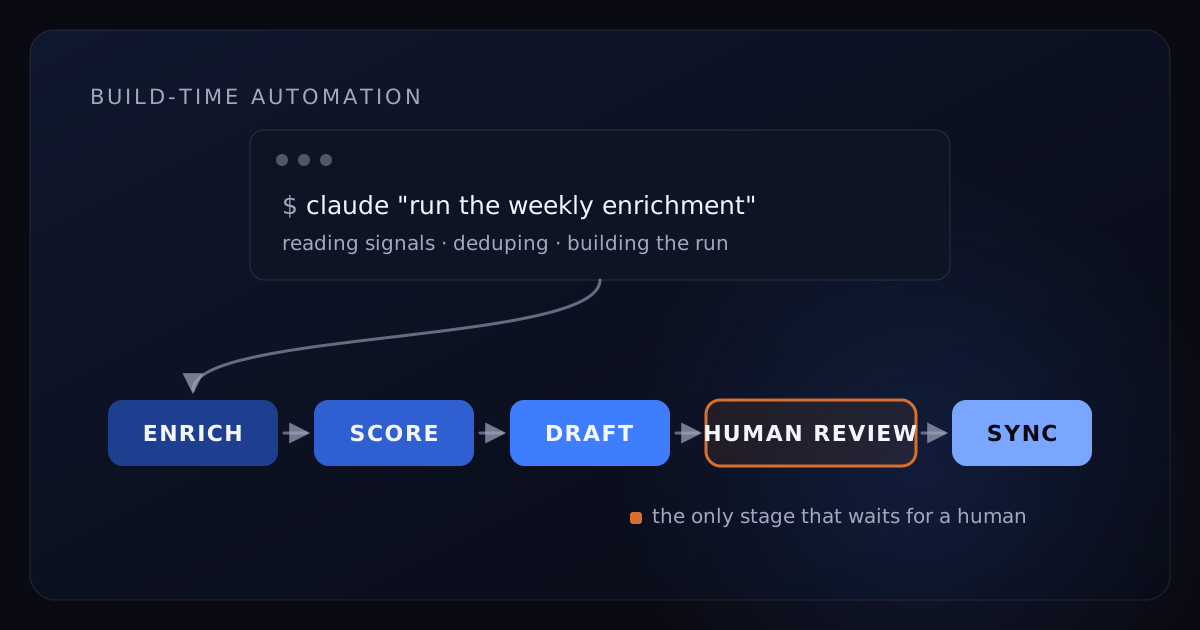
Most guides to Claude Code for sales are written by vendors hoping Claude Code will call their API. This one is written by a company that opens Claude Code every working day to build an AI sales product — the enrichment pipelines, the signal monitors, the reporting, the outbound QA, and the product itself. We're not describing what should be possible. We're describing what we ran this week.
That vantage point changes the article in two ways. First, the workflows below are the survivors — the ones that kept earning their place after the novelty wore off — with the setup and the actual prompts (simplified, but real) that make them dependable rather than impressive-once. Second, we know exactly where Claude Code stops, because we run a business on both sides of that line: Claude Code builds sales systems brilliantly, and it cannot answer a lead at 9:47 on a Tuesday night. The second half of this post is about that boundary, because it's the part every vendor guide quietly skips.
- Claude Code is an agent in your terminal: it reads files, writes and runs code, and calls APIs. It does the work — chat drafts text about the work.
- Five workflows earn their keep for us daily: waterfall enrichment pipelines, buying-signal watchers, CRM hygiene and reporting, outbound QA against reply data, and disposable internal tools.
- The setup is most of the value: a CLAUDE.md operating manual, packaged skills, MCP connections, and new-hire-grade guardrails — read-only keys, review-file writes, never sends.
- The hard limit is build-time vs run-time: a session you start can't answer leads in seconds, around the clock. That layer is infrastructure, and it's why AiDA SDR exists.
What Claude Code is (and why sales teams keep discovering it)
Claude Code is Anthropic's coding agent. It grew up in a terminal — it now also ships as a desktop app and in the browser — and the terminal heritage sounds like a detail when it's actually the whole point: instead of chatting with a model about your work, you point the agent at a folder of your files and it reads them, writes and executes code, calls APIs, and shows you what it did. You describe outcomes in plain English; it handles the implementation. It was built for software engineers — and then RevOps leads, founders, and the people now calling themselves GTM engineers started treating it as the best operations hire they never made.
The reason is unglamorous. The real day of a sales-operations person is not strategy decks. It's CSV exports with inconsistent columns, a CRM full of duplicates with three spellings each, four data vendors with overlapping coverage and separate bills, and a folder of "temporary" spreadsheets from 2024 doing load-bearing work. That is precisely the terrain a coding agent is good at. Claude Code doesn't give you advice about the export — it opens the export.
That's also the clean line between Claude Code and regular Claude in a browser. Chat is a thinking partner: account research, call prep, positioning, drafts you'll edit. It produces words you act on. Claude Code produces work you review — a deduplicated file, a running script, a report with the numbers already checked. Both belong in a sales org; we published a separate Claude-for-sales playbook for the chat layer, and if you want the wider map of where any of this fits, start with our operator's guide to AI in sales. This post is the deep cut on the tool that does the work.
The sales workflows Claude Code actually runs for us
Some context for what follows: we build AiDA SDR, an AI system that answers leads and books meetings, and Claude Code is in that build loop daily. Along the way it absorbed most of our own sales-operations work too. Plenty of experiments didn't survive contact with a real pipeline. These five did.
Lead enrichment pipelines: waterfall scripts instead of burnt credits
Enrichment vendors bill per record. Coverage overlaps, quality varies field by field, and the naive workflow — upload the whole list to your favorite provider — pays premium rates to re-learn things your CRM already knows.
Our pipeline is a waterfall, and Claude Code both wrote it and maintains it. Every new list gets deduplicated against the CRM export first, because you should never pay to learn what you already know. Records that survive go to the cheapest adequate provider; the expensive provider is called only for rows still missing the fields that actually gate outreach — a verified email, a current title. Every value carries a source column, every run logs credits spent, and every script prints its row counts in a dry run before it spends a dollar.
The part that changed our behavior isn't the script — it's the maintenance. Vendors change APIs, lists arrive in new shapes, targeting priorities shift monthly. "Also skip anyone we've contacted in the last 90 days" used to be a ticket in an engineering backlog; now it's a sentence typed into a session, applied and tested in minutes. Pipelines you can amend in English are pipelines that actually stay current.
Buying-signal watchers: monitors that run while you sleep
Cold lists are a tax; signals are the rebate. We watch six signal types across target accounts — hiring surges, funding events, technology changes, website visitors, new roles and job changes, and competitor engagement — and each one has a watcher: a small script Claude Code wrote in an afternoon that pulls fresh events from a data source on a schedule, filters them against our ICP definitions, dedupes against accounts already in motion, and writes a ranked file for a human to review with their coffee.
Two design choices matter more than any of the code. First, watchers only ever produce a list — they never message anyone. The gap between "found the account" and "contacted the account" is where all the judgment lives, and something with judgment stays in that gap. Second, watchers run on a schedule rather than in a session, which is the first hint of the boundary this post ends on: the moment you want software to act on the world without you starting it, you've left Claude Code's home territory and entered infrastructure.
CRM and pipeline hygiene: dedupe, backfill, and the Monday report that writes itself
Every CRM converges on entropy: duplicate accounts, dead deals squatting in stage two, fields nobody has filled since the person who cared about them left. Claude Code is the first tool that made cleanup cheap enough for us to do continuously instead of annually.
The pattern that makes it safe is write-to-review. Sessions read the CRM through read-only credentials and produce a plan — a merge file for the duplicates it matched on domain, name distance, and shared contacts; an update file for the backfills — and a human skims the plan and applies it. The agent does the two hours of matching; the human does the ninety seconds of judgment. Nothing writes to the system of record on its own.
Reporting works the same way. The Monday report reads the exports and produces pipeline by stage against last week, deals gone quiet for 21+ days grouped by owner, and reply rates by sequence for the trailing two weeks against the prior two. One standing instruction turns it from a chart into a briefing: when a number moves sharply, open the underlying rows and say why. "Reply rate fell" is trivia. "Reply rate fell because the two sequences we paused were carrying it" is a decision.
Outbound QA: auditing copy against reply data, not opinions
Message-quality debates are usually taste contests. We ended ours by making Claude Code the analyst. It reads the live sequences and the trailing 90 days of reply outcomes, correlates openers and claims with positive replies, silence, and unsubscribes, then checks every factual claim in every sequence against the current offer doc and the voice guide. The output is a ranked list of the three edits most likely to matter, with the evidence attached to each.
The audit reliably catches the embarrassing drift nobody owns: a case-study number that changed a quarter ago, a feature claim from two pivots back, one sequence writing as "we" while another writes as "I." Copy rots silently. A weekly automated audit is the only schedule on which the rot gets caught before a prospect catches it.
Disposable internal tools: the someday tickets that now take an afternoon
Every sales org carries a backlog of tools too small to build: a dashboard for one campaign, a territory-overlap checker, a reconciler for two vendors' conflicting exports of the "same" companies, a lead-routing simulator that would settle a recurring argument. Claude Code collapsed the cost of these from "sprint" to "afternoon," which changes which ones get to exist.
The liberating part is disposability. A tool built in an afternoon can be deleted without a funeral — we've shipped tools with a shorter lifespan than the meeting that requested them, and that's not waste, that's the point. The question stopped being "is this worth building?" and became "is this worth an afternoon?" A very different backlog gets cleared under that math.
The setup that makes Claude Code work for a sales team
The gap between a wow demo and a dependable system is not the model — it's the context and the guardrails. Our rule is to treat Claude Code exactly like a sharp new hire: nobody hands a new hire the CRM password on day one and says "do sales ops." A new hire gets an operating manual, repeatable procedures, and scoped access that expands as trust is earned. So does the agent.
CLAUDE.md: the operating manual your agent actually reads
CLAUDE.md is a plain-text file in your working folder that Claude Code reads at the start of every session — standing orders, so you stop re-explaining your business every morning. Three things belong in it: your definitions, your safety rules, and your working preferences. Here's an excerpt simplified from ours — the structure is real, the specifics are generalized:
# Sales ops automation — working rules

## Data safety
- CRM credentials are READ-ONLY. All writes go to a review file
  (out/pending-updates.csv); a human applies them.
- Never message, email, or contact a prospect from a session. Ever.
- Prospect data stays in this repo. No pasting rows into other tools.

## Definitions
- "Qualified" = matches docs/icp.md AND has a buying signal
  under 30 days old.
- "Hot account" = two or more signals inside 30 days.
- "Stale deal" = no activity in 21 days.

## How to work
- Enrichment is a waterfall: dedupe against the CRM export first,
  cheapest provider next, premium provider only for missing fields.
  Log credits spent per run.
- Every script gets a --dry-run flag and is safe to re-run.
- Print row counts and wait for approval before any bulk operation.
Notice what it isn't: not prompts, not clever wording. House rules. The definitions stop the agent from guessing what "qualified" means — the most expensive guess in sales automation. The safety rules make entire failure classes impossible rather than merely unlikely. And the working preferences — dry runs, re-runnable scripts, count-then-confirm — are the difference between automation you trust and automation you babysit.
Skills: packaging a workflow so the whole team can run it
The first time you run a workflow, it's a conversation — you correct the matching logic, tighten the output format, tell it what it got wrong. The mistake is leaving it a conversation forever. Once the process is right, have Claude Code package it as a skill: a folder holding the instructions and the scripts, loaded on demand by name. Our Monday report went from a twenty-minute guided session to a sentence.
Skills are also the honest answer to "can non-developers use this?" Building the skill takes one technical-adjacent owner — RevOps, a founder, an ops lead with API-key tolerance. Running it takes the ability to type "run the weekly report" and read the output. One person packages; the whole team runs. Every adoption story we believe follows that shape, and none of the "roll it out to all forty reps" stories do.
MCP servers and data-access guardrails
MCP — Model Context Protocol — is the standard that lets the agent talk to your tools directly. CRMs, enrichment platforms, and data providers increasingly ship MCP servers, and when they do, "pull every open deal with no activity in three weeks" stops requiring a CSV export first. Before building anything custom, check which of your vendors already offer one; we keep an honest, layer-by-layer map of that market in our guide to the best AI sales tools.
Direct connections raise the stakes, so the guardrails stay boring and non-negotiable: read-only credentials wherever the vendor allows them; writes land in review files that humans apply; no session ever sends anything to a prospect; anything that bills per record dry-runs and reports counts before it spends. None of this meaningfully slows daily work. All of it means a bad session costs a re-run instead of an apology email — the same draft-versus-send logic that governs any AI touching your pipeline.
Three prompts to steal
These are simplified from real sessions — paths shortened, vendor names generalized. Steal the structure, not the words: each one encodes a principle that transfers to any stack.
1. The enrichment run. The principle: never spend before counting.
Here's this week's signal pull: data/accounts-jul14.csv (about 400 rows).
1. Check every row against data/crm-export.csv — drop anyone we already
   have full contact data for, and anyone contacted in the last 90 days.
2. Run the waterfall in scripts/enrich/ on what's left: base provider
   for firmographics, premium provider only where title or email is
   still missing.
3. Write out/enriched.csv with a source column per field and a
   credits-spent summary at the end.
Dry-run first — show me the counts at each step before spending
anything.
2. The Monday report. The principle: demand the why, not just the number.
Build the Monday report the way skills/weekly-report defines it:
- pipeline by stage vs last week
- deals with no activity in 21+ days, grouped by owner
- reply rate by sequence, trailing 14 days vs the prior 14
Where any number moved more than 20%, open the underlying rows and
tell me WHY it moved, not just that it did. Output report.md plus a
one-paragraph summary I can paste into the team channel.
3. The outbound audit. The principle: copy answers to data, not to taste.
Audit sequences/current/ against the last 90 days of reply data in
data/replies.csv.
- Which openers and claims correlate with positive replies? With
  unsubscribes and silence?
- Check every factual claim against docs/offer.md and flag anything
  stale or unsupported.
- Check tone against docs/voice.md.
Rank the three edits most likely to improve reply rate, with the
evidence for each.
Notice the shared DNA: every prompt names its inputs, defines its output, and builds in a checkpoint before anything irreversible or expensive. None of them asks the agent to be creative. Creativity is for the offer; the automation should be dull, auditable, and re-runnable.
Where Claude Code stops: build-time vs run-time
Here's the thesis the vendor guides won't give you, because it doesn't sell an integration: sales automation splits into two kinds of work, and Claude Code is built for exactly one of them.
Build-time work is deliberate. You start it, latency measured in minutes is fine, and the output is an asset — a list, a report, a script, a tool. Everything above this paragraph is build-time. Run-time work is event-driven. A lead replies, fills a form, or visits your pricing page; the value of your response decays in minutes; and the work has to happen whether or not anyone on your team is awake. The two kinds of work need different machines.
| Dimension | Build-time (Claude Code) | Run-time (AI SDR infrastructure) |
|---|---|---|
| Starts when | You open a session | A lead does something |
| Uptime model | While you're working | Always on, every channel |
| Acceptable latency | Minutes to hours | Seconds |
| Failure cost | Re-run the script | A winnable lead books with a competitor |
| Output | Lists, reports, scripts, tools | Conversations, qualification, booked meetings |
| Oversight | You watch it work | Governed autonomy with approval modes |
The layers also compound differently. Build-time output is classic infrastructure — every pipeline, skill, and cleaned dataset makes next week's work cheaper, which is the systems-versus-campaigns thesis in miniature. Run-time coverage doesn't compound at all. It either exists this minute or it doesn't, and you can't bank Tuesday's coverage for Saturday night.
A session you start can't answer a lead in 60 seconds
The lead-response research is brutal about run-time. The Lead Response Management study — replicated widely since 2007 — found that contacting a lead within five minutes versus thirty makes you roughly 21x more likely to qualify them, and that the odds of making contact at all drop about 100x across that same gap. The Harvard Business Review audit of 2,241 US companies found an average first response of 42 hours, and 23% of companies never responding at all. We've unpacked what the data says about the 5-minute window separately; the short version is that response speed is a coverage property, not an effort property.
Now set that clock against how Claude Code operates. A lead replies at 9:47 on a Tuesday night. The window effectively closes by 9:52. Claude Code has no listener — it doesn't know the reply exists — and there is no version of this where a human opens a terminal in time, every time, on every channel, indefinitely. That's not a criticism of the tool. It's a category: the CLI is a workshop, and nobody staffs a workshop like a fire station.
What always-on response actually requires
Write down what run-time takes and it stops looking like a weekend script: persistent listeners on all four channels — LinkedIn, email, voice, and SMS; conversation state that survives days of silence and mid-thread channel switches; qualification logic that runs inside the reply, in your voice; live calendar access so the system can offer two or three real times conversationally instead of tossing the buyer a booking link and calling it engagement; approval modes while autonomy is being earned; and monitoring for the system itself, because run-time infrastructure that fails silently is worse than none. That's a product with an uptime requirement, not an automation with a cron schedule.
This is why AiDA SDR exists — we hit this boundary ourselves, building for ourselves. The honest relationship between the layers: Claude Code builds and maintains much of the machinery around the run-time core — the pipelines, the watchers, the QA, the reporting — and the run-time system answers every reply in seconds, 24/7, qualifies in the conversation, and books the meeting. The systems we run this way have booked 7,000+ meetings, and new deployments typically stand up live pipeline in under 30 days. Build-time made those systems cheap to improve. Run-time made them impossible to beat to the phone.
If you run RevOps and want to start this week
- Pick one weekly hour-eater. The Monday report, list cleanup, a recurring export-and-reconcile. Not your hardest problem — your most repetitive one.
- Start with exports, not credentials. Work from CSV files in a folder on day one. You get most of the value with none of the access risk, and you'll learn the tool's habits before it touches anything live.
- Write a one-page CLAUDE.md. Definitions, safety rules, output preferences. Steal the skeleton above; yours will be better because it's yours.
- Run the workflow conversationally once, correcting as you go. The corrections are the process documenting itself — don't rush this part.
- Package it as a skill the moment the output is right, so next week it runs from a sentence instead of a conversation.
- Add scoped access only after the workflow earns it. Read-only keys, review-file writes, no sends. Expand access the way you'd expand a new hire's.
- Hold the boundary. The moment a workflow needs to react to a lead in seconds rather than run on your schedule, stop building. That's run-time. Buy it or build it deliberately — a stack of scripts pretending to be infrastructure is how leads get dropped politely.
A month of this and you'll have a small library of skills, a cleaner CRM, reports that write themselves, and a precise sense of where your build-time ends. What sits past that line isn't a bigger script. It's a system that never sleeps — and that one you shouldn't build in a terminal.
Frequently asked questions
What is Claude Code and how is it different from Claude.ai for sales work?
Claude Code is Anthropic's agent for executing work: it reads files, writes and runs code, and calls APIs instead of drafting text in a chat window. It started in the terminal and now also ships as a desktop app and in the browser — on every surface, you point it at your files and it does the work. For sales operations, that's the difference between getting advice about an enrichment pipeline and having the pipeline built, run, and logged by the end of the session. Chat is where you think; Claude Code is where the work ships.
Can non-developers on a sales team use Claude Code?
Yes — for running workflows that already exist, you describe the task in plain English and the agent writes and executes the code. In practice, one technical-adjacent owner (RevOps, a founder, an ops lead) should build the foundation: the CLAUDE.md rules, the packaged skills, the data connections, and the guardrails. Once that exists, "run the Monday report" is a sentence, not a script.
What sales tasks can Claude Code actually automate?
The build-time layer: waterfall lead enrichment, prospect research, buying-signal monitoring (hiring surges, funding events, technology changes, website visitors, job changes, competitor engagement), CRM dedupe and hygiene, pipeline reporting, and QA of outbound copy against real reply data. The common thread is work you start deliberately and review when it's done — not work that reacts to a lead in real time.
Can Claude Code respond to leads and book meetings on its own?
No. Claude Code runs in sessions a person starts; it is not an always-on system listening for inbound. Answering a lead in seconds at 9pm, qualifying in the conversation, and offering real calendar times requires persistent infrastructure on every channel — that's the AI SDR layer, and it's a different kind of system than a coding agent.
How much does Claude Code cost for a sales team?
It's included in Claude's paid individual plans and higher-tier team seats, with heavy API usage metered separately — check current pricing, since plans change faster than blog posts. The more useful budgeting rule: most teams need one or two power users who own the automations, not an org-wide rollout. The workflows they package can then be run by anyone.
Is it safe to give Claude Code access to CRM and prospect data?
It's safe the way giving a new hire access is safe: it depends entirely on scoping. Use read-only credentials wherever possible, route all writes through a review file a human applies, and never let a session send anything to a prospect directly. Those three rules cost you almost nothing day to day and remove almost all of the real risk.