
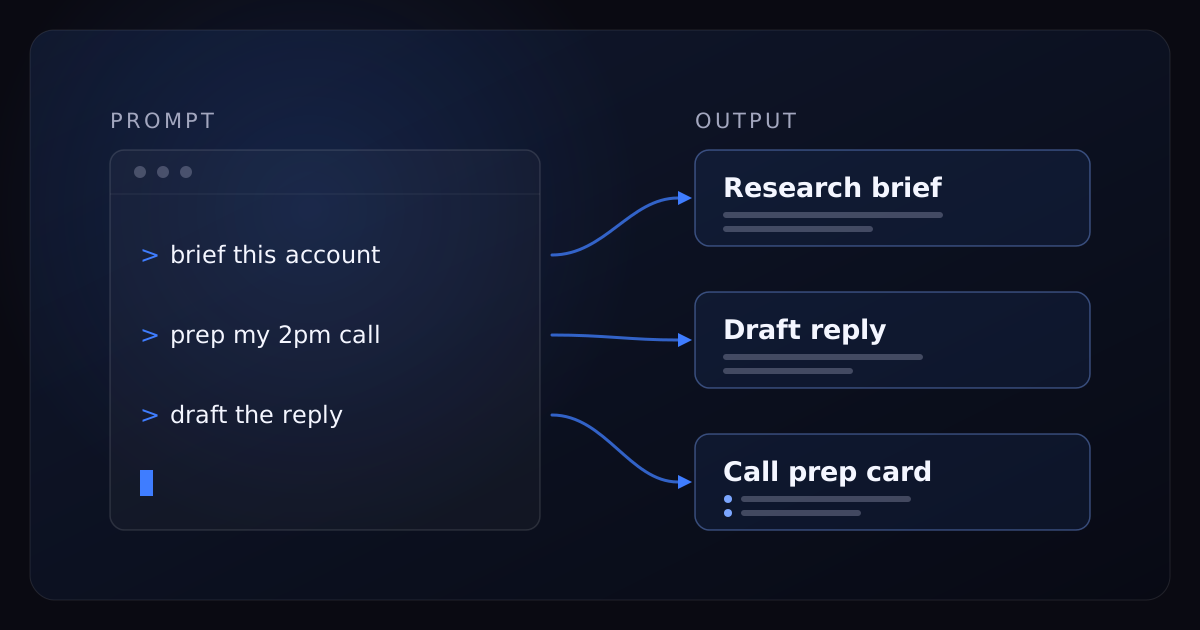
Search "Claude for sales" and you'll mostly find the same page wearing fifty different logos: a numbered list of prompts, each one a light rewording of "write me a cold email." Here's what that genre gets wrong: prompts are the least important part. We build and run AI sales systems for a living, we use Claude every day, and the gap between "mildly useful" and "changed how I sell" has never once come down to prompt phrasing.
It comes down to context and consistency. Claude with no context produces the same competent, generic output for you as it does for your competitor — it knows exactly as much about both of you, which is nothing. Claude briefed like a new hire — your ICP, your offer, your proof points, your objections, your actual voice — produces work that reads like your best rep on a good day. The briefing takes one afternoon. Almost nobody does it, which is precisely why it works.
This playbook covers that setup, the five workflows worth running every week (with prompts you can lift as-is), what to do when a workflow proves out, and — because we'd rather be trusted than tidy — the honest line where Claude stops and always-on infrastructure begins.
- Prompts are a commodity; context is the asset. One afternoon building a sales profile document outperforms every prompt list ever published.
- Put that profile in a Claude Project so every conversation starts fully briefed — re-pasting context is how these workflows quietly die.
- Five weekly workflows carry most of the value: signal-triggered research, pre-call prep, reply drafting, post-call follow-up plus CRM hygiene, and the Friday pipeline review.
- When a workflow proves repeatable, graduate it to Claude Code and Skills so the whole team runs it identically as one command.
- Claude works at human latency. It has no always-on signal monitoring and no sub-minute reply handling — that layer is infrastructure, not chat.
Why most "Claude for sales" advice dies on contact with a real pipeline
The prompt-listicle genre assumes your bottleneck is phrasing. It isn't. When Claude's output disappoints a sales team, one of three things is actually broken, and none of them is the prompt.
The model doesn't know your business. A cold email prompt with no ICP, no offer, no proof points and no voice samples produces the exact statistical average of every sales email ever written — which is to say, something your prospect has already deleted a hundred times this quarter. The fix isn't a longer prompt. It's a briefing the model can reuse.
Generic output is a briefing problem, not a model problem.
Every rep briefs differently. One rep gets something great, another gets mush, and the difference is whatever each happened to paste into the chat that morning. A workflow whose quality depends on the mood of the prompter is not a workflow; it's a slot machine with better typography.
Chat happens at human latency. Even a perfectly briefed Claude only works when someone opens a conversation. A meaningful share of sales outcomes is decided in the minutes when nobody is at a keyboard — we'll come back to that at the end, because it's the boundary of the entire DIY approach, and pretending otherwise is how "AI sales" content loses your trust.
So the playbook runs in that order: fix context once, run the workflows weekly, automate what proves out, and be honest about the remainder.
The one-time setup: brief Claude like a new hire
You would never put a new SDR on the phones with zero onboarding and then blame them for sounding generic. That's what most teams do to Claude. The fix is a one-time briefing kit with three parts: a profile document, a home for it, and a data connection.
Build the sales profile document
Open a doc and write down, plainly, what a good new hire would need on day one:
- ICP. Who actually buys — titles, company size, industry, and the observable traits that separate your best customers from everyone else. Include the disqualifiers; knowing who to skip is half of targeting.
- Offer. What you sell, the pain it maps to, and your pricing posture. Posture is enough — "premium, annual contracts, no free tier" tells Claude more than a rate card would.
- Proof points. The specific results you can defend, phrased exactly the way you're allowed to say them publicly. Claude will reuse these verbatim, which is the point.
- Objections. Your top ten, each with the best response your team has actually used on a live call. Transcribe your best rep; don't compose something nicer than reality.
- Voice samples. Three to five real emails you sent that got replies. Not your most polished writing — your real writing. This is the single biggest lever for output that doesn't sound like AI.
- Lost-deal reasons. Why deals actually die. Everything Claude drafts gets sharper when it knows what failure looks like for you specifically.
Two to four pages. It's homework, and it feels like homework — that's the moat. Every competitor has access to the same model; almost none of them will write this document.
Where the profile lives: Claude Projects, not fresh chats
A fresh chat knows nothing. If the profile has to be re-pasted into every conversation, your reps will stop doing it by Thursday, and the whole system decays into occasional novelty use. Claude Projects fix this: create a project for sales, upload the profile document and voice samples as project knowledge, and every conversation inside it starts fully briefed.
Add a short standing instruction to the project — something like: "You support outbound sales at [company]. Use the sales profile for every task. Match the voice samples. If you're not sure about a fact, say so instead of inventing one." That last sentence will save you more embarrassment than anything else in this post.
If your team runs distinct motions, split them into separate projects — one for outbound, one for live deals, one for pipeline reviews — so each set of instructions can be specific instead of diplomatic.
Connect the CRM and calendar — read-only first
Claude connects to outside tools through MCP connectors, and official connectors exist for the major CRMs — HubSpot and Salesforce among them — plus calendars. This upgrades every workflow below: "prep me for my 2pm with Meridian" replaces five minutes of copy-pasting, and the Friday pipeline review runs on live records instead of a stale export.
Two rules. Start read-only: let Claude read deals, contacts, and notes before it can write anything, and add write access later, object by object, only where you actually want it. And keep customer data off personal free-tier accounts — commercial Claude plans don't train on your data by default, which is the assurance your ops and legal people will ask about first.
The whole setup, in order:
- Write the sales profile document — one afternoon, two to four pages.
- Create a Claude Project; upload the profile and voice samples; add the standing instruction.
- Connect your CRM through an MCP connector, read-only. Calendar too.
- Run the pre-call prep workflow below on every call for one week.
- When output is wrong, fix the profile document — not the prompt. The document is the product.
- After two weeks, note which workflow you run most. That's your first candidate for Claude Code.
Five Claude sales workflows worth running every week
If you came for Claude prompts for sales, they're here — five of them, copy-paste ready, with the bracketed parts yours to fill. But be clear about what's doing the work: the profile document. These same prompts without the setup above produce exactly the generic output you've already seen.
1. Signal-triggered account research
Most prospecting research is wasted because it's alphabetical: work the list top to bottom, regardless of timing. Research pays when a buying signal triggers it — hiring surges, funding events, technology changes, website visitors, new roles and job changes, competitor engagement. We've ranked which buying signals actually predict pipeline; this workflow is what to do in the ten minutes after one fires.
1. What this signal most likely means for their business right now — three hypotheses, most likely first.
2. Who owns the problem we solve there — likely titles, and names if you can find them.
3. The angle: connect this signal to the specific pain in my ICP, in two sentences I could say out loud.
4. Three facts about the company I could reference naturally in outreach — recent, specific, no trivia.
5. A disqualifier check: anything visible that suggests they're a bad fit for us.
Keep it to one page. If you can't verify something, mark it "unverified" — do not fill gaps with plausible guesses.
The disqualifier line is the most valuable part. Research that can't conclude "skip this one" isn't research; it's a brochure. Expect a real fraction of signal-triggered briefs to end in a skip — that's the system working, not failing.
2. The two-minute pre-call prep
The goal is a card you can read on your phone between meetings. The rule that makes it work: feed Claude the real materials — the actual email thread, the actual CRM notes — never your summary of them. Summaries strip the signal: tone, hesitation, the question they asked twice, the one they ignored.
• Who they are in one line, plus one credible opener that isn't about the weather.
• What they've already been told, so I don't repeat it.
• The three questions most worth asking, in order.
• The objection they're most likely to raise, and my best response given my proof points.
• One deal risk to listen for.
Format it to be readable on a phone in under two minutes.
With the CRM connected, this collapses to "prep me for my 2pm with [company]" — Claude pulls the record itself. That alone is the best argument for doing the connector setup.
3. Reply drafting and objection handling
The mistake everyone makes here is summarizing the thread: "they asked about pricing, what should I say?" Paste the entire thread — every message, in order, including yours. Claude reads context you'd summarize away, and the drafts improve immediately and obviously.
Two notes from running this pattern constantly. First, when the next step is a meeting, have the draft offer two or three specific times rather than a scheduling link — making the buyer do your admin is a conversion tax. Second, the "what did I miss" line is quietly the best part of the workflow: Claude is unreasonably good at spotting the question a prospect asked that never got answered.
4. Post-call follow-up and CRM hygiene in one pass
The twenty minutes after a call is where deals leak: the follow-up goes out late, the CRM never learns what happened, the thing you promised gets forgotten until the prospect reminds you. This workflow turns one paste into four artifacts.
1. The follow-up email — my voice, under 150 words, recapping only what we actually agreed, with the next step and date we set.
2. CRM updates as a flat list I can enter in one minute: stage, next step, close-date change if any, new contacts mentioned and their roles.
3. A three-bullet internal note: where the deal stands, the biggest risk, what I need from my team.
4. Everything I promised on the call, as a checklist.
Do not include anything that isn't in the notes. If something important is ambiguous, list it under "confirm before sending."
With CRM write access enabled — later, deliberately — step two stops being a list you retype and becomes an update Claude applies. Earn that with a few weeks of accurate read-only output first.
5. The Friday pipeline review
Most pipeline reviews are theater: stale stages, optimistic close dates, and nobody rude enough to say so. Claude has no such manners problem.
1. Flag every deal with no next step or no activity in 14+ days. Those first.
2. The three deals the data says deserve Monday morning, and why.
3. The deals I'm probably kidding myself about — stale stage, close date slipped twice, single-threaded — and for each, one honest test: a real ask that forces a yes or a no.
4. What my stage distribution says about where this pipeline will be in 60 days.
Be blunt. I want the review a good VP of Sales would give, not encouragement.
Run it every Friday with the same prompt and keep the outputs. A month of these is a better coaching record than most QBR decks — you can see which risks you spotted early and which ones you argued with.
Level two: when a workflow proves out, encode it in Claude Code
Chat is where workflows get discovered. It's a bad place for them to live long-term, because chat quality depends on the person driving. The graduation path is Claude Code — Claude working in a terminal with access to files, scripts, and APIs — plus Skills: written procedures the model loads and follows, so "build the account brief" becomes one command that pulls the CRM record, runs your research steps in order, and outputs the brief in your exact format, every time, for every rep.
The graduation test is simple. A workflow is ready when you run it more than a few times a week, the output format has stopped changing, and it needs to touch systems — read files, call an API, write to the CRM — rather than just produce text you copy out. Pre-call prep and pipeline reviews usually graduate first.
We're an AI sales company that builds with these tools daily, and we've written up exactly how — the enrichment pipelines, the signal-watcher scripts, the outbound QA — in our guide to Claude Code for sales. Read it when a workflow here starts feeling like it deserves a command of its own.
Where Claude stops and infrastructure begins
Now the part the prompt listicles never include. Everything in this playbook shares one property: it happens when a human opens a chat. That makes Claude a force multiplier on the rep — and structurally incapable of covering three things that decide a large share of revenue.
- Always-on signal monitoring. Signals fire on their schedule, not yours. The hiring surge you notice on Thursday was a Monday signal, and the vendor who moved on Monday is already in the inbox. Watching hiring surges, funding events, technology changes, website visitors, new roles, and competitor engagement across a whole market is a job for a system that never closes the tab — not for a person with a chat window and good intentions.
- Speed to lead. The Lead Response Management research puts contacting a lead within five minutes at roughly 21x the qualification odds versus waiting half an hour — and the odds of making contact at all drop off a cliff between those marks. Claude can draft a flawless reply, but only after you've seen the message. At 9pm on a Tuesday, you haven't. The five-minute window is won or lost by whatever answers when nobody is at a keyboard.
- The sending and booking layer. Chat produces text. It doesn't run sequences across LinkedIn, email, voice, and SMS, answer an inbound reply in seconds at 2am, or book the meeting by offering real calendar times in the conversation. That's infrastructure, and no amount of prompting turns a chat window into it.
This is the assist-versus-autonomous line we map in our operator's guide to AI in sales: Claude is the best assist layer most reps will ever have, and the always-on motion belongs to autonomous systems running under human-in-the-loop oversight — drafts approved until autonomy is earned, volumes governed, judgment kept. That second class of system is what we build: AiDA SDR watches the signals continuously, answers every reply in seconds around the clock, and books meetings conversationally. It's a large part of how the systems we run have booked 7,000+ meetings — not because that AI is smarter than the one in your chat window, but because it's always there.
Use Claude for everything above, starting this week — it will make you the best-prepared rep in most of your meetings by Friday. Just don't ask a chat window to be infrastructure. They're different layers, and the teams that win run both.
Frequently asked questions
Can Claude connect to my CRM?
Yes. Official MCP connectors exist for major CRMs — HubSpot and Salesforce among them — and community-built connectors cover most of the rest. Start with scoped, read-only access so Claude can read deals, contacts, and notes without changing anything, then add write permissions object by object, only where you actually want updates applied.
Is Claude better than ChatGPT for sales?
For the work that fills pipeline — deep account research, long-context analysis like feeding 50 accounts plus your full ICP into one conversation, and drafts that read like a peer wrote them — Claude is the one we reach for. ChatGPT is strong for high-volume brainstorming and visuals. The honest answer is to run both on one real workflow for a week and standardize on the winner.
Can Claude write cold emails that don't sound like AI?
Yes, but the fix is context, not clever prompting. Give it three to five real emails you sent that got replies, your ICP, hard constraints — under 120 words, no "Quick question" subject lines — and one researched detail per prospect. Generic output is a briefing problem, not a model problem.
Do I need Claude Code, or is the chat app enough?
The chat app with Projects covers most of what a single rep needs. Move a workflow to Claude Code and Skills once it has proven repeatable and you want the whole team running it identically as one command, or when it needs to read files, call APIs, or write to the CRM rather than just produce text you copy out.
Is my sales data safe in Claude?
Commercial Claude plans don't train on your data by default, which answers the fear most teams actually have. The practical risk surface is connector scope: a CRM connector with write access can change records, so start read-only and expand deliberately. And keep customer data off personal free-tier accounts entirely.
Can Claude replace an SDR?
No, and the reason is structural rather than a quality gap. On its own, Claude works at human latency — someone has to open the chat or run the command. It has no always-on signal monitoring, no sending infrastructure, and no way to answer an inbound reply in seconds at 2am. It makes one rep dramatically faster at research, prep, and drafting; covering the always-on layer takes a different class of system.